


Why installer training takes time and doesn't guarantee quality?
Training installers with traditional methods — lectures, briefings, and videos — does not prepare employees for real-world conditions. In the shop, everything is different: a non-standard unit, tight deadlines, pressure from the foreman.
As a result, installation errors repeat from shift to shift: wrong sequence of operations, loose connections, safety violations. Each such defect leads to downtime, rework, missed deadlines, and additional costs to fix.
A particular pain point is staff turnover. An experienced installer leaves, and a newcomer spends weeks learning the basics on a live site while making mistakes.
Knowledge does not accumulate in the company: staff are trained on an ad hoc basis, without a system, and every new employee starts almost from scratch. A manager spends time on supervision rather than on developing the site.
At the same time, it’s not about the people. Even a responsible employee cannot “get the hang of it” on real equipment without risking something breaking or someone getting injured.
So upskilling staff always comes up against the same dilemma: either train on the fly and lose money on defects, or pull people away from work and send them to expensive courses that don’t cover your specific processes.
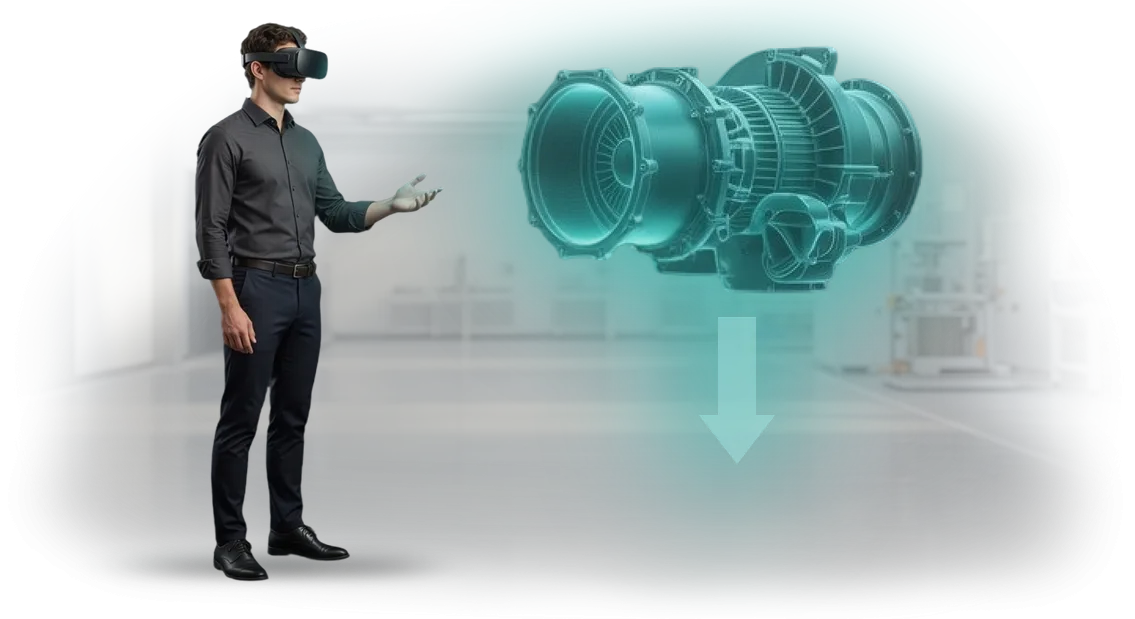
VR training for manufacturing solves this problem. An employee practices installation errors in a safe virtual environment that matches your site — here they can try, make mistakes, and drill actions until they become automatic, without downtime or accidents.
Installer training becomes predictable: you know exactly which skills have been practiced and get a quality result faster. We help you implement this format — from scenario to launch.
What a VR simulator will give your production and employees
Training installers on a real site is slow, expensive, and risky. A newcomer’s mistake turns into defects, downtime, and a safety threat.
A VR simulator moves skill practice into a safe virtual environment where employees learn from their mistakes without consequences for production.
We develop VR scenarios around your real tasks and equipment. Below is what changes for production and for people.
Reduced defects
Employees practice operations until they become automatic before stepping onto a real site. The virtual environment instantly shows errors and prompts the correct sequence — so on the line, installers act more confidently and accurately.
In our projects, companies report a noticeable reduction in defects within the first months after implementing the simulator. Fewer reworks — lower material and time costs.
Faster onboarding
Instead of months of mentoring — intensive VR sessions that can be completed without interrupting production. The scenario doesn’t depend on weather, site availability, or a mentor’s schedule, so training can be planned around the work rhythm.
A newcomer reaches the level of an experienced specialist faster, while current employees master new units and technologies without downtime. As a result, preparation is accelerated many times over.
Workplace safety
The most valuable outcome is the preserved health of workers. In VR, employees can practice actions for emergencies, work at height, and use dangerous tools without real risk. The employee remembers the correct actions rather than learning from an injury.
Managers get confirmation that each installer has completed the mandatory scenarios and is cleared to work. This reduces the burden on the occupational safety department and protects the company from the consequences of incidents.
VR and AR training formats for installers and other specialists
VR and AR training for installers covers different tasks: from practicing complex assembly operations to quickly briefing new employees. To choose the right format, you need to consider what exactly is being trained and who will be learning.
| Format | For whom | What it gives the client |
|---|---|---|
| VR assembly simulator | Installers, maintenance personnel | Practice of operation sequences without risk and without stopping production |
| AR briefing | New employees, workers on a new site | Step-by-step prompts directly “over” real equipment — faster onboarding |
| Interactive safety training | All personnel, including line managers | Simulation of emergency scenarios, response to abnormal situations |
| VR simulator for rare operations | Highly qualified specialists | Maintaining a skill that is rarely encountered in real work |
The VR format lets installers learn from mistakes that would be costly in reality: wrong sequence, wrong tool, safety violation. Employees see the consequences immediately, so the skill is retained faster than when reading instructions. For the company, this means fewer injuries, fewer defects, and shorter time-to-competency.
AR briefing is a different story: you don’t need to pull employees away from the workplace. A person puts on glasses or points a tablet at the unit — and sees prompts: which cable, in what order, with what force.
This format is ideal for training right in the shop and for quality control when assembling complex units.
Each format can be adapted to your procedures and equipment. We build scenarios together with your process engineers so that employees train on real operations, not abstract examples. As a result, training doesn’t distract from production — it makes production more efficient.
All formats run on professional equipment and software that we support: from stationary VR systems to mobile AR devices. You don’t need to understand the technical details — we’ll select a solution for your task, budget, and employee skill level.
How we develop a VR simulator: from brief to launch
For you, VR simulator development is not a “black box” but a transparent process with fixed stages and checkpoints.
We have already delivered dozens of projects for companies that needed to train personnel quickly without interrupting production, so we follow a proven methodology. Each stage is coordinated with you, and you know in advance what you will get and when.
-
Training brief — we record goals, the number of installers, critical errors, and evaluation criteria. The output is a clear project plan with budget and timeline.
-
Work operations audit — we study real processes and your procedures, and talk with future users. This ensures the simulator reflects your specific standards, not an abstract “typical” scenario.
-
Simulator scenario — we turn production steps into interactive tasks with prompts and an evaluation system. You see and approve the scenario before development begins, so changes are inexpensive.
-
VR module build — we create an interface that is clear to employees without prior training. You receive interim demo versions and can make adjustments as work progresses.
-
Pilot launch — we test the simulator with a small group of installers, collect feedback, and refine details. Error and completion-time statistics show where the training is delivering results.
-
Project approval and handover — you approve the final version, we provide instructions and train your administrators. After that — support and updates for new production procedures.
We handle the entire process from brief to launch: you get a schedule, a project manager, and regular reports. This saves your team time and protects against missed deadlines when VR training is pieced together in-house.
What’s included in the VR training delivery: a complete package for the client
The VR training delivery includes a ready-to-launch package: training modules, teaching materials, staff instructions, and support. Your employees can start training from day one — nothing needs to be assembled or figured out.
- Training VR modules for installers. Scenarios reflect real work processes, from tool preparation to site acceptance. Employees train in a safe environment and arrive on site prepared.
- Teaching materials for instructors. Ready-made lesson plans, debrief questions, and evaluation criteria — instructors don’t need to develop anything from scratch.
- Instructions for staff. Simple guides: how to use the headset, follow safety rules, and set up the work area. Clear even for those who have never used VR.
- Results tracking system. Automatic reports show who completed the module, how many attempts were made, and which errors occur most often. Managers can see the progress of each installer and the whole group.
- Post-delivery support. Technical support, content updates for new work techniques, and scenario modifications to match your standards — we stay in touch after launch.
In the end, you get a working system, not a “box of software”: review the guide, launch the training, receive a report, and see who needs more training.
Case study: how a VR simulator reduced installation errors at a plant in 3 months
At a metal structures manufacturing plant, defects during unit installation reached 15% — each error meant line downtime, rework, and missed shipping deadlines.
Experienced installers worked quickly, but newcomers needed 3–4 months to reach a safe pace, and their mistakes were the most costly.
We developed a VR simulator that exactly replicates the work operations: part feeding, slinging, tolerance control, and the sequence of actions.
Training takes place in a safe virtual environment where injury and equipment damage are impossible, but every mistake is recorded and reviewed with a mentor.
Within three months, the plant achieved measurable results: the number of installation errors dropped by 42%, and the time newcomers needed for typical operations decreased by a quarter. This means fewer reworks, faster assembly, and no line downtime due to retraining.
The chief engineer of the plant shared the results: “We expected VR to be a nice demonstration, but we got a working system. A month after implementation, the new installers were making half as many mistakes as the previous shift after three months of internship.
Now we plan to move all employees to the simulator and update scenarios for new units.” After the project, the plant ordered simulators for two other workshops — a better indicator than any guarantee.
How to choose the right VR training format for your production needs?
At first glance, it seems that since VR training exists, the format is one — put on a headset and train.
In practice, the choice of VR format depends on production tasks: teaching an installer to work safely at height is one thing, perfecting the sequence of operations when assembling a unit is another, and practicing actions in an emergency situation is a third.
There is no universal solution, and that’s where the main mistake lies: companies buy “training in VR” without understanding which scenario will produce real results and which will remain a nice demonstration for a report.
The selection criteria are determined by what you want to change in your employees’ work. If the goal is to reduce installation errors, we build a scenario with step-by-step control and instant feedback.
If you need to prepare a newcomer to work with expensive equipment, we create an environment where they can practice without the risk of breakdown or production downtime.
When the task is to assess the qualifications of current installers, the VR format becomes an evaluation tool: you see who is coping and who needs additional training. So training selection begins not with technology, but with an analysis of your production situation.
Over 10+ years we have carried out dozens of VR training implementations for industrial companies and learned that individual production requirements almost always differ from typical templates.
We don’t sell a “boxed” solution; we offer a format — from short modules for mass training of newcomers to detailed simulators for rare and dangerous operations.
The choice of format is documented in the technical specification, agreed with you, and adjusted after the first testing with real employees.
Tell us what problem you want to solve: speed up the onboarding of newcomers, improve safety, or standardize installer skills. We will analyze your process, suggest a suitable VR training format, and show how it will fit into your current preparation program. This way, you get not “trendy VR” but a working tool that measurably improves production results.
Frequently asked questions about developing VR and AR training for employees
Before starting VR training, clients ask the same questions — about guarantees, equipment, timelines, and budget. We answer directly, without technical details: only what affects your work and training outcomes.
What happens if the VR equipment breaks down?
We deliver the package with a safety margin and support the project after launch. If a device breaks, we promptly replace it, and your employee doesn’t lose time — they simply continue the next training cycle.
The warranty and support are included in the contract. So “what if it breaks” is our responsibility, not your headache.
Will we have to buy expensive computers and headsets?
No. We select equipment for the training scenario: for installers, a standalone headset that doesn’t require a powerful PC is usually enough. The package can be rented or included in the project cost.
You don’t need to understand the hardware. We deliver a ready-made solution: configured, tested, and with instructions for the employee.
How long does VR simulator development take?
On average, two to four months, depending on the number of scenarios and the level of detail. At the start, we fix stages with checkpoints so you can see progress and influence the result.
Faster options are possible if we build on ready-made modules from our library rather than creating everything from scratch.
How much does VR training development cost?
We calculate the budget from the specific task: the number of scenarios, the number of workstations, and whether integration with your training system is needed. That’s why the first meeting starts with questions about your task, not with a ready-made price tag.
We offer several formats — from a short demo module to a full course. You choose the option that solves the task and fits the budget.
How do we integrate VR training into an existing program?
We don’t replace existing training; we complement it. The VR simulator gives employees practice in a safe environment, and results can be exported to your training system — so you see the progress of each installer.
One employee on site is enough to launch the scenario. The rest complete the exercise in turn, without interrupting the production schedule.
Submit a request for VR simulator development for your employees
Installer training involves risks: mistakes on site cost money, and a mentor physically cannot devote time to every newcomer.
A VR simulator moves skill practice into a safe environment where employees can repeat complex operations as many times as needed without stopping production.
After your request, you get a ready-made solution for your tasks: realistic scenarios, automatic evaluation of actions, and clear analytics for each employee.
We handle development, setup, and support, and your instructors get a tool that is easy to integrate into the current training program.
What you get after submitting a request:
- Submitting a VR training request takes a couple of minutes, and a consultation will help you understand which simulator format is right for your installers.
- A project estimate with accurate timelines and work stages — no hidden items or unexpected additional costs.
- A demonstration of the simulator on your real scenario before full development starts.
- A ready-made solution that employees master within one shift and use without developer involvement.
- Teaching materials for instructors and training for your team on working with the system.
- Support after launch and simulator updates for new procedures or equipment.
To start a project, contact us in any convenient way — we’ll send examples of VR training for your industry and answer questions about timelines.
Submit a VR training request through the form on the website, and we’ll get back to you with a personalized proposal within one business day.